August 28, 2026 · Products
SevenGoals: an iPhone App for Brian Tracy's 10 Goals Method
I built an iPhone app that helps you work on your life goals using Brian Tracy’s method. It’s called SevenGoals, it’s free, and in this post I’ll explain how the method works and why the app turned out the way it did.
It started with a paper notebook. Every morning, a blank page and a list of what I wanted to achieve within a year. From memory, without checking yesterday’s list.
A month in, I noticed that three items from my original list had never come back to me once. That turned out to be the most useful thing the exercise gave me: those goals weren’t mine.
What the 10 goals exercise actually is
Brian Tracy, author of Maximum Achievement and Goals!, called this the most powerful exercise he knows. The instructions are short:
- Get a notebook.
- Every morning, write down ten goals you want to reach in the next twelve months.
- Write them from memory, without looking at yesterday’s list.
- Phrase them in the present tense, first person, as already done: not “I want to lose weight” but “I weigh 165 pounds.”
- Repeat daily.
That’s it. No vision boards, no three-hour planning sessions. Five minutes in the morning.
Tracy’s promise is that thirty days of this changes your life beyond recognition. That’s his phrasing, and it sounds like something off a seminar flyer. The mechanism underneath it, though, is fairly ordinary.
Why it works
The list filters itself
When you write from memory, you physically cannot recall everything. That’s the whole trick. Every morning what actually matters floats to the top, and the rest quietly falls away.
Two weeks in, you’ll notice some goals never came back at all. That’s your answer: they were borrowed. Someone else’s expectations, a trend, a vague “I probably should.”
No task manager does this. In a to-do list a goal lives forever until you delete it by hand — and you never do, because you promised yourself.
The wording gets sharper
On day one you write “earn more.” On day five, “earn $8,000 a month.” On day fifteen, “reach $8,000 a month through two clients on retainer.”
Daily rewriting works like sanding. A vague wish turns into a task with a visible first step. And a task with a visible first step is halfway done.
You start noticing openings
Psychologists call this selective attention. The classic example: you buy a red car and suddenly the city is full of red cars. They were always there — your brain was filtering them out as noise.
When you remind yourself of a goal every morning, it moves onto the list of things that matter. A course ad, a passing remark, a random post in your feed stop being noise, and you start seeing them.
This isn’t the universe sending signs. It’s your attention filter being retuned. It just feels the same from the inside.
Why seven goals instead of ten
When I started building the app, I put in ten fields, exactly as Tracy prescribes. Within a week I had stopped filling them in myself.
Ten is a lot. So many that you pad the last three out of obligation: “read more,” “drink water,” “sleep enough.” The exercise turns into filling in a form, and the point — remembering what’s actually burning — disappears.
Seven is where the list is still honest. Enough to cover different areas of life: work, money, body, relationships, something for the soul. Few enough that you don’t start inventing.
Seven is also Miller’s “magical number,” the classic estimate of short-term memory span. That estimate has since been revised downward, so treat it as a pleasant coincidence rather than an argument. But the name stuck.
How the app works
The idea was to stay out of the way. An app for a daily habit shouldn’t require a habit of its own.
One day, one blank screen
Open it in the morning and you get an empty field and a prompt: write down your most important goals for today. No list waiting for you, nothing checked off from last night.
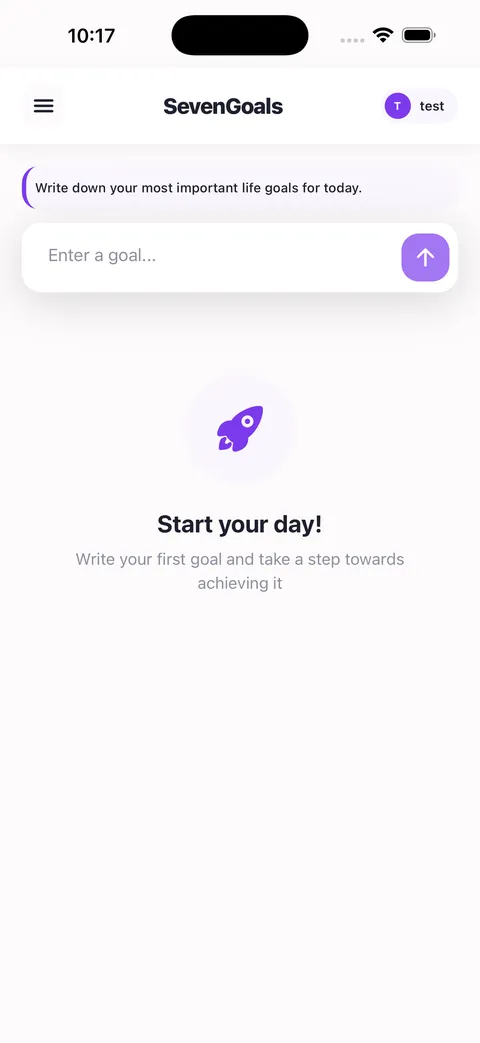
Goals go in one at a time, and the counter at the top shows what’s left: “1 of 7, six more to go.” That’s the only place the app pushes you — and it pushes you to remember, not to tick a box.
Yesterday isn’t pre-filled
No autofill, no suggestions, no autocomplete from past entries. This is deliberate: the moment an app starts prompting you, the exercise dies. The entire value is in recalling them yourself.
Steps live inside the goal
Goals without action are daydreams. So any goal expands, and you write concrete steps underneath it: under “start a business,” find an idea and find investors; under “run every morning,” buy running shoes.
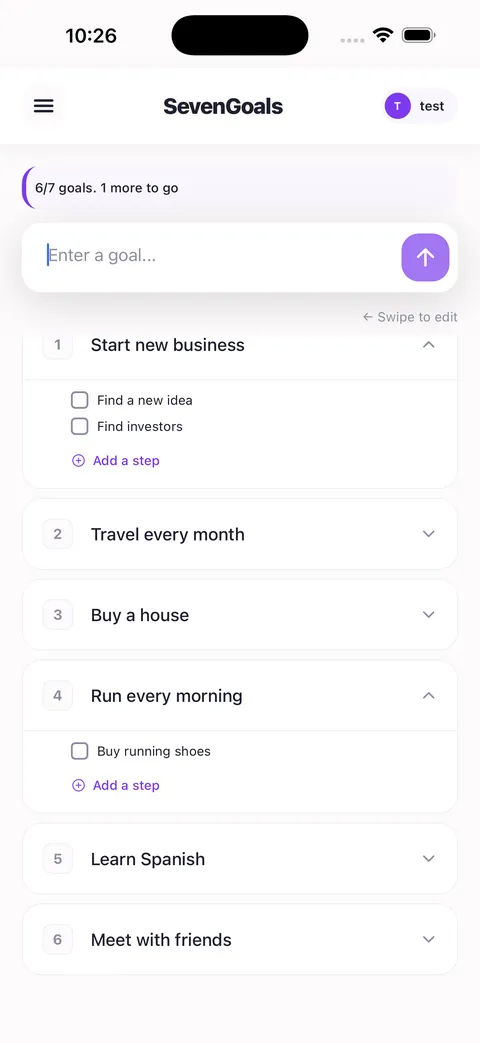
The step is physically attached to the goal instead of living in a separate to-do list. This is exactly where things usually break: goals in one app, tasks in another, and they never meet.
Calendar and archive
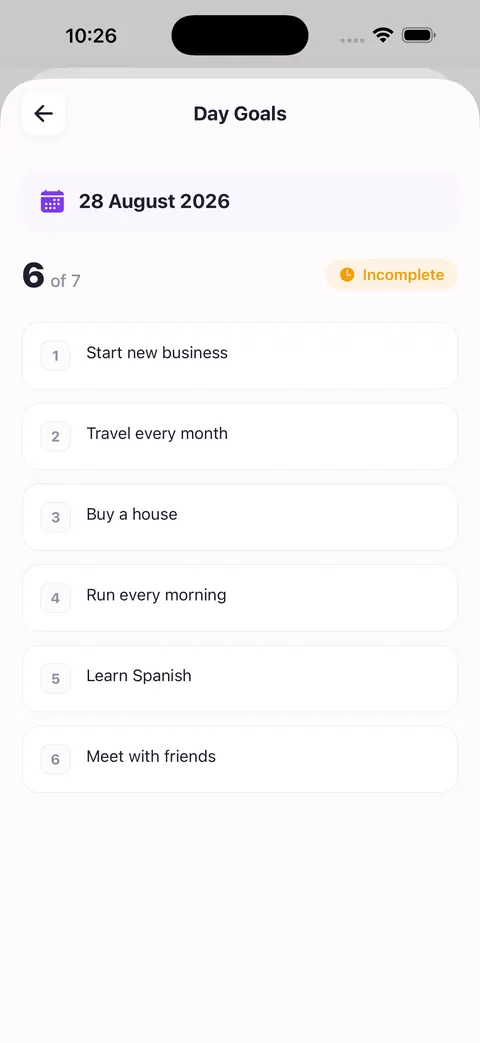
Scroll the calendar back and you open your list from a month ago in full — exactly as you wrote it that morning.
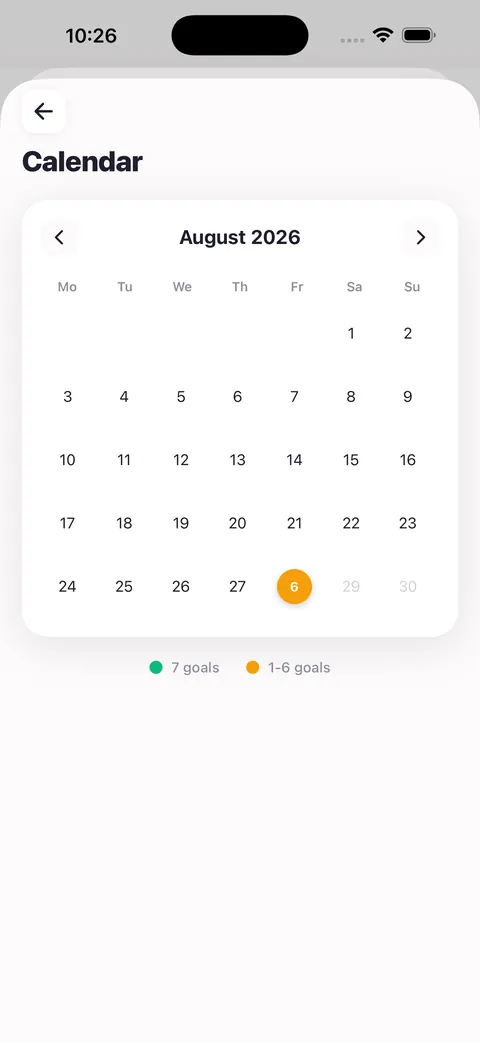
This is probably the most interesting part. Comparing what you wrote 60 days ago with what you write today shows movement better than any chart: some goals left, some got rewritten, some are already closed.
Statistics — and yes, a streak
Here I have to be honest. The app does have a streak counter, a count of days with all seven goals filled, and an average goals-per-day figure. That is technically the gamification I wanted to avoid.
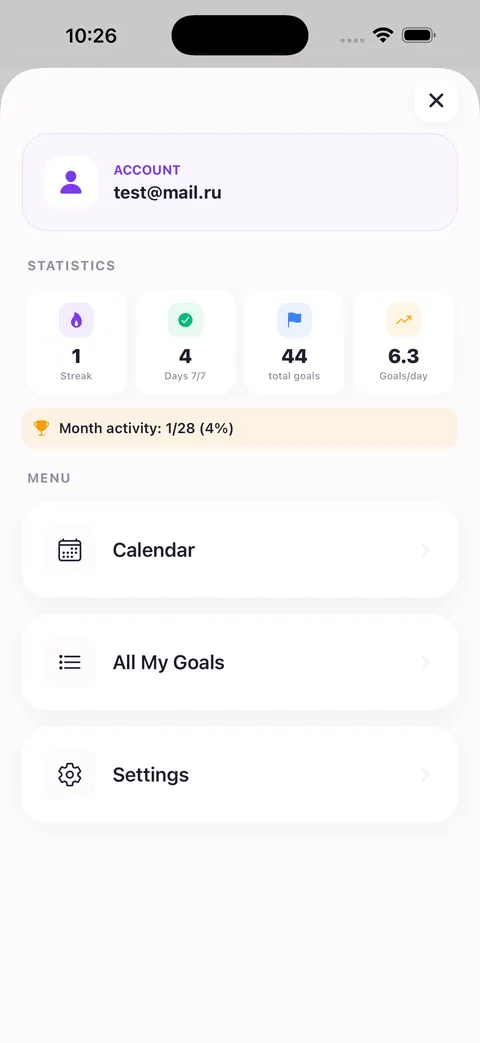
What it doesn’t have: a feed, friends, likes, levels or badges. Nobody sees your goals and nobody competes with you. It’s a private notebook, not a social network. The streak exists for one reason — to show you haven’t skipped three days running — not to hand out medals.
Reminders and export
Two optional reminders: one in the morning to write your goals, one in the evening to check your steps. Both switch off with a single toggle if they get in the way.
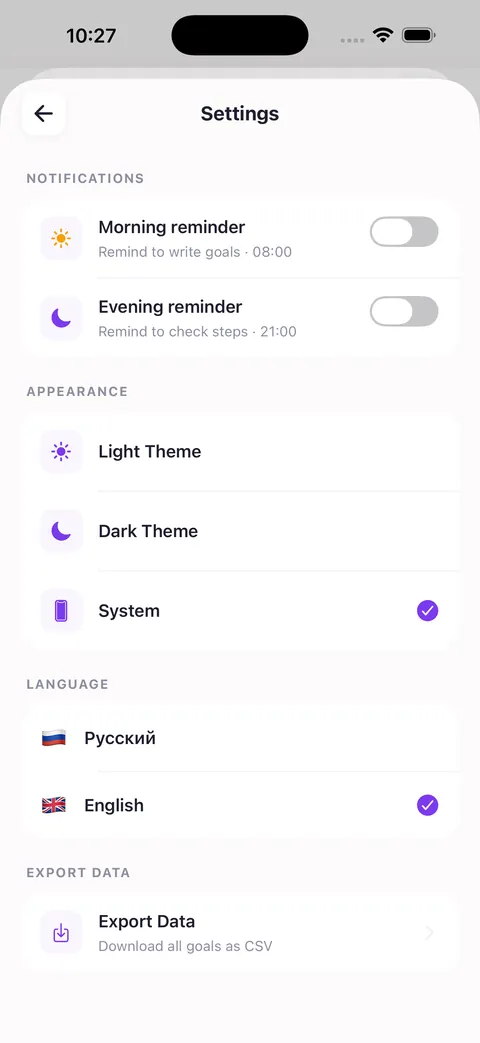
And the whole archive exports to CSV with one tap. The data is yours: if you want to leave, you take everything with you. The interface switches between English and Russian, and the theme can be light, dark or system.
The app is free and runs on iPhone with iOS 15.1 or later. Entries sync to your account, so a new phone doesn’t cost you your history. More on the SevenGoals page, or get it on the App Store.
How to make it stick
Attach it to a habit you already have. Not “I’ll write my goals in the morning,” but “I write my goals while the coffee brews.” New habits survive when they hook onto old ones.
Don’t panic about missed days. Skipped one? Continue the next. This isn’t about an unbroken streak, it’s about accumulation. Four days out of seven still works.
Write in the present tense. “I launched the project,” not “I want to launch the project.” The difference looks cosmetic, but “I want” locks in the state of wanting, and there you stay.
Don’t edit the past. You’ll be tempted to go back and fix an old entry. Don’t. It’s a snapshot of how you thought that day, and it’s valuable precisely because it’s crooked and real.
Give it a month. The first week feels like copying the same thing over and over. Things start shifting in week three.
Who this is for
- People with plenty of goals, none of which are moving.
- People who set up Notion, Trello and a paper planner, then quit two weeks later because maintaining the system took more energy than the work.
- People who suspect they’re living off someone else’s list and want to find out what they actually want.
- People who like short morning rituals: five minutes, a cup of coffee, a clear head.
Who it isn’t for: if you’re looking for a corporate task tracker with teams, deadlines and kanban boards, this isn’t it. SevenGoals deals with personal goals and your personal day.
Try it for a month
The technique costs nothing — you can do it in a paper notebook and it will work. The app just removes the friction: no notebook to find or carry, and the history files itself into an archive that’s genuinely interesting to scroll.
Download it, turn on the morning reminder, and hold out for 30 days. Worst case, you spend two and a half hours over a month and learn a few uncomfortable things about yourself.
SevenGoals — Daily Tracker on the App Store · free, iOS 15.1+
If you try it, write to me at vesninrunner@gmail.com and tell me how it went. I’m curious which goals drop off first for other people.